

Technology Blog

Endpoint Detection and Response: Modern Security Essentials
Source:https://kliklegal.com

At 3:14 AM on a rainy Tuesday, a remote diagnostic workstation inside a regional health network began silently executing encrypted scripts. There was no suspicious email attachment downloaded, no suspicious link clicked, and no traditional virus file dropped onto the hard drive. A threat actor was using “living-off-the-land” tactics—leveraging legitimate administrative Windows tools to strip privileges and map out patient databases. Standard legacy antivirus sat completely silent because no known malware signatures were triggered.

What stopped that breach from becoming a multi-million-dollar ransomware catastrophe was a single automated alert generated by our endpoint detection and response software. In less than forty seconds, the system recognized the anomalous process hierarchy, severed the machine’s network connection, and contained the threat before a single byte of patient data could be encrypted.
Over my 10+ years writing about technology and advising healthtech platforms on infrastructure security, I have witnessed a fundamental shift in cyber warfare. We have moved far beyond the era where a simple firewall and daily antivirus scans could protect digital assets. Today, endpoint detection and response (EDR) stands as the ultimate perimeter, providing the continuous visibility and rapid containment capabilities required to survive modern cyber threats.

Beyond Traditional Antivirus: Why Legacy Defenses Are Failing

To understand why legacy security tools are no longer sufficient, we must examine how modern attacks operate. Traditional antivirus relies heavily on signature matching—checking incoming files against a database of known threats. If a virus signature isn’t in the database, the door stays wide open.
Think of traditional antivirus like a security guard at a building entrance holding a paper guest list with printed photos of known trespassers. If a intruder wears a convincing suit, uses a stolen keycard, or enters through an unmonitored window, the guard won’t blink an eye.
Endpoint detection and response, by contrast, operates like a network of AI-powered smart cameras placed inside every hallway and room of the building. It doesn’t just check who enters; it constantly tracks behavior. If someone in a doctor’s lab coat suddenly attempts to pick the lock on a secure server room at 3:00 AM, the system instantly locks down the door and alerts security, regardless of what badge they are wearing.
Legacy antivirus fails against modern attack vectors for several distinct reasons:
  • Fileless Malware: Attacks that run entirely in a computer’s volatile memory (RAM) without writing executable files to the disk.
  • Zero-Day Exploits: Brand-new software vulnerabilities for which no patch or antivirus signature yet exists.
  • Credential Stuffing and Living-off-the-Land (LotL): Attackers using legitimate administrative tools (like PowerShell or WMI) to bypass static defenses unnoticed.

Core Pillars of Endpoint Detection and Response Architecture

EDR solutions do not simply block known bad files; they gather continuous telemetry across every connected laptop, server, cloud instance, and specialized endpoint in your enterprise. By transforming raw system events into structured threat intelligence, EDR provides four foundational capabilities:

1. Continuous Telemetry and Behavioral Monitoring

A lightweight endpoint agent installed on each device records every process creation, registry modification, network connection, and file access in real time. This continuous stream of system telemetry provides complete visibility into what is happening across your entire infrastructure.

2. Behavioral Heuristics and Threat Analytics

Instead of looking solely at what a file is, EDR evaluates how processes interact. By mapping activity to established cyber frameworks like the MITRE ATT&CK framework, the system flags suspicious behaviors—such as a PDF reader suddenly attempting to modify system boot configurations or dump memory credentials.

3. Automated Containment and Remediation

When high-confidence malicious behavior is detected, speed is everything. Modern EDR platforms execute pre-configured playbooks to isolate infected hosts from the network, terminate malicious process trees, quarantine rogue files, and roll back unauthorized system changes within seconds.

4. Forensic Investigation and Proactive Threat Hunting

Security Operations Center (SOC) teams use EDR to perform deep-dive forensics. Security analysts can trace the entire attack timeline—from the initial point of entry down to the exact command-line arguments executed—allowing teams to patch root vulnerabilities and proactively hunt for hidden threats.

Step-by-Step Implementation Guide for Growing Teams

Deploying endpoint detection and response across an enterprise requires careful planning to maximize visibility without disrupting daily business operations.

Step 1: Complete an Endpoint Inventory Audit

Catalog every device accessing your corporate network, including remote laptops, cloud virtual machines, on-premises servers, and specialized healthtech or IoT endpoints. You cannot protect what you cannot see.

Step 2: Deploy Lightweight Agents via Centralized Management

Utilize unified endpoint management (UEM) or mobile device management (MDM) tools to roll out lightweight EDR agents across all identified assets. Ensure the agent runs with elevated privileges so it can monitor kernel-level activities and resist tampering.

Step 3: Establish Baseline Policies and Tune Signal-to-Noise

During the first two to three weeks, run your EDR in monitoring mode to establish a baseline of normal user and application behavior. Tune out benign false positives—such as custom internal software updates—to prevent operational friction.

Step 4: Integrate with SOC Workflows and SIEM/XDR Systems

Connect your EDR platform to your broader Security Information and Event Management (SIEM) or Extended Detection and Response (XDR) ecosystem. Configure automated alert routing so critical threats immediately reach your security on-call team.

Expert Advice: Pro Tips and Hidden Warnings

Pro Tip: Beware of “Alert Fatigue” – Prioritize High-Fidelity Signal
The biggest enemy of an effective Security Operations Center is alert fatigue. If your team receives thousands of unvalidated warnings every day, critical alerts will inevitably slip through the cracks. Configure your endpoint detection and response policies to auto-contain high-risk threats while aggregating low-severity events into single contextual incidents. Focus your analysts’ human review time strictly on high-fidelity, actionable intelligence mapped to advanced MITRE techniques.
Hidden Warning: The Fatal Blind Spot of Unmonitored Shadow Endpoints
An EDR solution is only as strong as its deployment coverage. Attackers intentionally scan corporate networks for forgotten legacy servers, unmanaged personal devices, or temporary contractor laptops that lack security agents. A single unmonitored endpoint connected to your network acts as an unencrypted bridge into your core databases. Enforce strict Network Access Control (NAC) policies that automatically block any device from accessing internal resources unless a healthy, updated EDR agent is verified.

Building a Resilient Digital Defense for the Future

Implementing robust endpoint detection and response is no longer an optional luxury for high-tech enterprises—it is a mandatory security baseline for any organization handling sensitive digital assets, proprietary code, or confidential healthcare records. By shifting your security strategy from reactive signature scanning to proactive behavioral monitoring and automated response, you ensure that even the most sophisticated zero-day threats are halted before they cause lasting operational harm.
What endpoint security measures is your team currently relying on, and what challenges have you faced when monitoring remote or hybrid devices? Drop your thoughts, questions, or field experiences in the comments below, and let’s dive into the discussion!
Portable Solar Chargers: Power Anywhere, Anytime

Source:https://cdn.shopify.com

Three years ago, during an off-grid field testing expedition in the rugged backcountry, my continuous health tracker and satellite communicator both hit critically low battery levels at the exact moment a severe storm system altered our path. With no electrical grid within fifty miles and dark clouds rolling in, keeping our health monitoring equipment and navigation tools operational was not just a luxury—it was a critical safety imperative. That afternoon, unfolding a lightweight 28-watt panel across a granite ledge saved our team from a complete communications blackout.

Over my 10+ years covering consumer technology and healthtech innovations, I have tested hundreds of mobile power solutions. The evolution of portable solar chargers has transformed them from slow, gimmick-filled novelties into high-efficiency, life-saving energy assets. Whether you are prepping for unexpected grid failures, monitoring health vitals on extended wilderness treks, or simply working remotely from a campsite, understanding how to harness portable solar energy effectively changes everything.

Photovoltaic Efficiency Demystified: How Portable Solar Chargers Work

At its core, a solar panel converts sunlight directly into direct current (DC) electricity through the photovoltaic effect. When photons from solar radiation strike silicon wafers inside the panel, they knock electrons free from their atomic orbits, creating an electrical flow guided through conductive channels into your USB or DC charging cables.
Think of solar cells like microscopic sponge beds catching falling rainfall. If the rain drops represent sunlight photons, a low-efficiency sponge lets most of the water bounce off or run off the sides. A high-efficiency sponge absorbs almost every single drop, channeling it directly into your storage bucket without wasting a drop.
When shopping for portable solar chargers, you will primarily encounter two types of silicon panel technologies:
  • Monocrystalline Silicon Panels: Cut from a single, continuous crystal structure, these panels offer the highest energy conversion efficiency available today (typically between 21% and 24%). They perform remarkably well in limited space and low-light conditions.
  • Polycrystalline Silicon Panels: Made from melted fragments of silicon fused together, these panels are cheaper to produce but offer lower efficiency (around 15% to 18%). They are bulkier, heavier, and far less suited for lightweight portable applications.
In mobile scenarios where every ounce counts, monocrystalline panels covered with durable ETFE (Ethylene Tetrafluoroethylene) protective coatings are the undisputed gold standard.

Key Metrics That Matter: Wattage, Voltage, and Smart Charging Circuitry

Understanding technical specifications is essential so you do not get misled by inflated marketing claims. Manufacturers test solar panels under Standard Test Conditions (STC)—1,000 Watts per square meter of light at 25°C (77°F). In real-world outdoor environments, factors like atmospheric haze, panel angle, ambient heat, and minor shading reduce actual output by roughly 20% to 30%.
To keep sensitive digital equipment and connected health tech—like pulse oximeters, smartwatches, continuous glucose monitors, and smartphones—running smoothly, you need to evaluate three core metrics:
  • Nominal Wattage Rating: Indicates the maximum theoretical power output under ideal conditions. A 15W panel is great for small power banks and phones, while a 28W to 60W folding array can easily charge multiple devices or larger power stations simultaneously.
  • Smart IC & Auto-Restart Technology: Standard solar panels drop their power output when a cloud passes over. Older models would trigger a “Charging Not Supported” error on smartphones, requiring you to manually unplug and replug the cable. Modern chargers feature built-in microchips that automatically reset the handshake protocol the moment full sun returns.
  • USB-C Power Delivery (PD) & Quick Charge (QC): High-end solar panels incorporate active voltage regulator modules that deliver standardized fast-charging protocols directly through USB-C ports, stabilizing output voltage even when sunlight fluctuates.

Form Factor & Durability: Matching Solar Gear to Your Lifestyle

Not all portable solar chargers are built for the same environmental demands. Choosing the right form factor depends on whether you are backpacking through humid rainforests or setting up an emergency home power backup station.
Here is how the two primary form factors compare in practice:
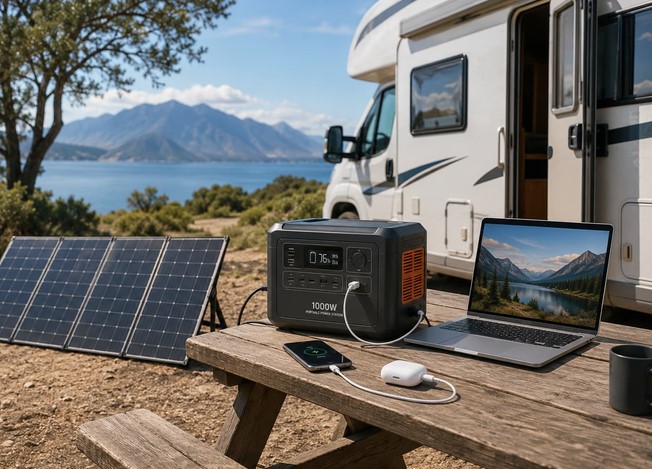
  • Folding Solar Panel Arrays: Designed with multiple hinged panels wrapped in rugged canvas or heavy-duty nylon. They fold down to the size of a paperback book, making them ideal for strapping onto a backpack or laying out across a tent. They offer higher surface area and significantly faster charging speeds.
  • Integrated Solar Power Banks: Small lithium-ion battery packs with a single tiny solar panel pasted on top. While convenient as emergency backups, their single panel generates negligible power—often taking up to 50 to 70 hours of direct sun to charge fully.
For reliable off-grid power, always opt for a multi-panel folding array combined with a separate battery bank rather than relying on a tiny integrated panel.
Look closely at the surface coating materials as well. Cheaper panels use PET (Polyethylene Terephthalate) laminate, which turns cloudy and degrades under intense UV exposure within a year or two. Premium panels utilize ETFE coatings, which offer superior light transmittance, scratch resistance, and self-cleaning water repellency.

Step-by-Step Guide: Optimizing Your Portable Solar Charger Output in the Field

Getting the most power out of your solar array requires active management. Follow this field protocol to maximize energy conversion throughout the day:

Step 1: Align for Perpendicular Sun Exposure

Position your solar array so sunlight strikes the panel surface at a precise 90-degree angle. Adjust the tilt angle three to four times a day as the sun tracks across the sky—this simple adjustment can boost daily energy yield by up to 40%.

Step 2: Prevent Shading Across Any Section

Even a tiny shadow covering just 5% of a monocrystalline panel can drop power output across the entire circuit by over 50%. Keep backpack straps, tree branches, and gear off the active cell surface.

Step 3: Manage Thermal Dissipation

Solar panels actually lose efficiency as their physical temperature rises above 25°C (77°F). Elevate your panel slightly above hot surfaces like rocks or asphalt to allow cooling airflow behind the back canvas.

Expert Advice: Pro Tips and Hidden Warnings

Pro Tip: Adopt the “Buffer Battery” Strategy
Never plug your sensitive smartphone or health monitoring hardware directly into a solar panel exposed to full sun. Instead, connect your solar panel to a high-capacity lithium-ion power bank, then use the power bank to charge your devices later in the shade. This protects your expensive device batteries from severe overheating, shields smart health sensors from voltage spikes, and ensures continuous charging even when intermittent clouds pass overhead.
Hidden Warning: Watch Out for Heat-Induced Battery Degradation
Leaving a smartphone or smartwatch sitting underneath a solar panel in direct sunlight is a recipe for permanent battery damage. Lithium-ion batteries degrade rapidly when exposed to temperatures above 45°C (113°F) while charging. Always place your connected devices in the shade behind the panel or under a thermal protective pouch while harvesting solar energy.

Harnessing Clean Energy for Absolute Off-Grid Independence

Mastering portable solar chargers bridges the gap between rugged outdoorsmanship and modern digital reliability. By prioritizing monocrystalline ETFE panels, using a buffer battery, and managing panel orientation, you gain complete energy independence wherever your journey takes you.
Whether you are keeping vital health trackers powered during a remote trail run or preparing your family’s emergency kit for grid outages, solar technology gives you the peace of mind that power is always within reach.
What off-grid tech or health devices do you plan on keeping powered with solar gear on your next adventure? Have you experienced any surprising solar charging challenges in the field? Share your thoughts and questions in the comments below, and let’s discuss your off-grid setup!